
时间:2025-05-30 20:50
人气:
作者:admin
扣子智能体websdk集成默认PAT是不安全的,官方也推荐使用JWT认证,就涉及到服务端集成OAUTH认证。另一个是默认PAT集成,每个人打开同一个session对话,并不满足实际生产环境需求。
First, 云端创建一个 OAuth应用 [服务类应用],如下:
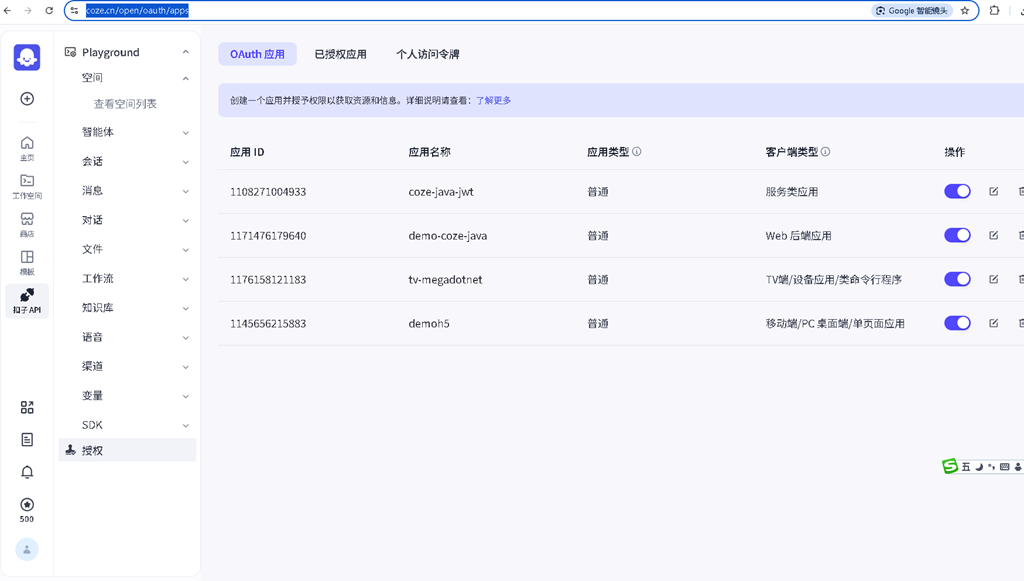
具体进一步的操作是

在服务端代码我们一版maven构建机制,修改如下源代码,示例代码在这儿,基于javalin, 同样也可改造为基于SpringBoot框架
"/token",
ctx -> {
// 处理OAuth回调并获取访问令牌
try {
OAuthToken tokenResp = oauthClient.getAccessToken(UUID.randomUUID().toString());
ctx.sessionAttribute(genTokenSessionKey(), tokenResp);
Map<String, String> model = new HashMap<>();
model.put("token_type", tokenResp.getTokenType());
model.put("access_token", tokenResp.getAccessToken());
model.put("refresh_token", "");
model.put(
"expires_in",
String.format(
"%d (%s)",
tokenResp.getExpiresIn(),
timestampToDateTime(tokenResp.getExpiresIn())));
if ("XMLHttpRequest".equals(ctx.req.getHeader("X-Requested-With"))) {
ctx.json(model);
return;
}
String html = formatHtml(readFromResources("websites/callback.html"), model);
ctx.contentType("text/html");
ctx.result(html);
} catch (Exception e) {
e.printStackTrace();
throw new RuntimeException("Authorization failed: " + e.getMessage());
}
})
Spring版本适配jar文件运行
/**
 * OAuth 2.0 认证令牌服务实现类
 * 提供与 Coze 平台集成的 JWT 令牌管理功能
 * 处理认证流程中的配置加载、临时文件创建、会话管理和令牌刷新等核心操作
 */
@Service
@Slf4j
public class OAuthTokenServiceImpl implements OAuthTokenService {

    // 配置文件相关常量
    private static final String configFilePath = "coze_oauth_config.json";
    public static final String XMLHTTP_REQUEST = "XMLHttpRequest"; // AJAX 请求标识头
    public static final String X_REQUESTED_WITH = "X-Requested-With"; // 请求来源标识
    public static final String AUTH_TOKEN = "auth_token"; // 会话中存储的 token 键名
    public static final String D_S = "%d (%s)"; // 过期时间格式字符串
    private static final String CONFIG_PATH = "classpath:coze_oauth_config.json"; // 配置文件路径
    private static final String TEMP_FILE_PREFIX = "coze_oauth_config_"; // 临时文件前缀
    private static final String TEMP_FILE_SUFFIX = ".json"; // 临时文件后缀

    // 依赖注入资源加载器
    @Autowired
    private ResourceLoader resourceLoader;

    // 私有字段
    private JWTOAuthClient jwtoAuthClient; // JWT 认证客户端实例
    private File tempConfigFile; // 用于存放配置的临时文件

    /**
     * 初始化方法,在 bean 构造完成后执行
     * 根据环境选择直接使用配置文件或创建临时文件来加载认证配置
     * @throws Exception 如果初始化失败
     */
    @PostConstruct
    public void init() throws Exception {
        Resource resource = resourceLoader.getResource(CONFIG_PATH);

        // 开发环境直接使用文件路径
        if (resource.isFile()) {
            jwtoAuthClient = JWTOAuthClient.loadFromConfig(
                    new LoadAuthConfig(resource.getFile().getAbsolutePath())
            );
            return;
        }

        // 生产环境创建临时文件
        createTempFile(resource);
        jwtoAuthClient = JWTOAuthClient.loadFromConfig(
                new LoadAuthConfig(tempConfigFile.getAbsolutePath())
        );
    }

    /**
     * 创建临时文件并复制配置内容到其中
     * 用于生产环境下非文件形式的资源配置处理
     * @param resource 资源对象
     * @throws IOException 如果文件操作失败
     */
    private void createTempFile(Resource resource) throws IOException {
        // 创建临时文件
        tempConfigFile = File.createTempFile(TEMP_FILE_PREFIX, TEMP_FILE_SUFFIX);
        tempConfigFile.deleteOnExit();

        // 复制资源到临时文件
        try (InputStream is = resource.getInputStream();
             FileOutputStream fos = new FileOutputStream(tempConfigFile)) {
            byte[] buffer = new byte[1024];
            int len;
            while ((len = is.read(buffer)) > 0) {
                fos.write(buffer, 0, len);
            }
        }
    }

    /**
     * 清理资源,在 bean 销毁前执行
     * 删除创建的临时配置文件,防止残留
     */
    @PreDestroy
    public void destroy() {
        if (tempConfigFile != null && tempConfigFile.exists()) {
            boolean deleted = tempConfigFile.delete();
            log.info("临时配置文件{}删除{}", tempConfigFile.getAbsolutePath(), deleted ? "成功" : "失败");
        }
    }

    /**
     * 获取 Coze 平台的 OAuth JWT 令牌
     * 包括将 token 存储到会话以及构建响应模型等操作
     * @return 包含认证信息的模型对象
     */
    @Override
    public OAuthTokenModel getCozeOauthJwtToken() {
        OAuthToken tokenResp = getOAuthToken();

        // 获取当前会话并存储 token
        ServletRequestAttributes attr = (ServletRequestAttributes) RequestContextHolder.currentRequestAttributes();
        HttpSession session = attr.getRequest().getSession();
        session.setAttribute(genTokenSessionKey(), tokenResp);

        String expiresInfo = String.format(D_S, tokenResp.getExpiresIn(), timestampToDateTime(tokenResp.getExpiresIn()));
        OAuthTokenModel oAuthTokenModel = new OAuthTokenModel
                (tokenResp.getAccessToken(), tokenResp.getRefreshToken()
                        , tokenResp.getTokenType(), expiresInfo);
        // 判断是否是 AJAX 请求
        if (XMLHTTP_REQUEST.equals(attr.getRequest().getHeader(X_REQUESTED_WITH))) {
            return oAuthTokenModel;
        }

        // 非 AJAX 请求也可以返回 model 或重定向等
        return oAuthTokenModel;
    }

    /**
     * 实际获取访问令牌的方法
     * 调用底层 SDK 获取新的令牌响应
     * @return 获取到的 OAuth 令牌响应对象
     */
    private OAuthToken getOAuthToken() {
        OAuthToken tokenResp = jwtoAuthClient.getAccessToken(UUID.randomUUID().toString());
        return tokenResp;
    }

    /**
     * 生成用于在会话中存储 token 的键名
     * @return token 的会话键名
     */
    private String genTokenSessionKey() {
        return AUTH_TOKEN;
    }

    /**
     * 将 Unix 时间戳转换为可读的日期时间字符串
     * @param timestampInSeconds 时间戳(秒)
     * @return ISO8601 格式的日期时间字符串
     */
    private String timestampToDateTime(long timestampInSeconds) {
        return Instant.ofEpochSecond(timestampInSeconds).toString();
    }

}
前端VUE.js的示例代码
      const cozeWebSDK = new CozeWebSDK.WebChatClient({
        config: {
          //修改为您的botId
          botId: import.meta.env.VITE_BOT_ID,
        },
        auth: {
          type: 'token',
          token: tokenValue,
          onRefreshToken: () => tokenValue
        },
        userInfo: {
          id: "12344",
          url: "//",
          nickname: "Guest",
        },
        ui:{
          base:{
            layout:"pc",
            lang:"zh-CN",
            zIndex:100
          },
          header:{
            isShow:false,
            isNeedClose:true,
          },
          asstBtn: {
            isNeed: true,
          },
          footer: {
            isShow: true,
            expressionText: 'Powered by Megadotnet',
            linkvars: {
              name: {
                text: 'A',
                link: 'https://www.test1.com'
              },
              name1: {
                text: 'B',
                link: 'https://www.test2.com'
              }
            }
          }
        },
        chatBot: {
          title: "Kids' Playmate | Snowy",
          uploadable: true,
          width: 800,
          el: undefined,
          onHide: () => {},
          onShow: () => {},
        },
      });
    });
官网webSDK
https://www.coze.cn/open/docs/developer_guides/install_web_sdk#c29240ae
鉴权
https://www.coze.cn/open/docs/developer_guides/authentication
会话隔离
https://www.coze.cn/open/docs/developer_guides/session_isolation
快速集成与部署:
灵活定制与扩展:
智能交互与个性化服务:
多模态交互支持:
拓展业务场景与应用范围:
提升业务效率与竞争力:
降低AI技术门槛:
促进AI生态系统的建设:
如有想了解更多软件设计与架构, 系统IT,企业信息化, 团队管理 资讯,请关注我的微信订阅号:

作者:Petter Liu
出处:http://www.cnblogs.com/wintersun/
本文版权归作者和博客园共有,欢迎转载,但未经作者同意必须保留此段声明,且在文章页面明显位置给出原文连接,否则保留追究法律责任的权利。
该文章也同时发布在我的独立博客中-Petter Liu Blog。

 关注微信